
Download Check My File Credit Report: Updated Step-by-Step Guide
If you’re preparing to apply for a mortgage, it’s important to know how to download your Check My File credit report correctly. Your adviser will often ask for this document to view your complete credit history — ensuring your mortgage application is accurate, efficient, and tailored to your circumstances.
At Mortgage Bridge, we help clients use their Check My File report to find the most suitable mortgage options, especially when income or credit history is complex. Here’s everything you need to know about Check My File, how it works, and how to download your report securely on any device.
What Is Check My File and How Does It Work?
Check My File is a multi-agency credit report provider that combines data from the UK’s leading credit reference agencies:
- Experian
- Equifax
- TransUnion
- Crediva
By gathering information from all four, it provides a full picture of your credit profile, including how lenders assess your financial behaviour.
Your report includes:
- Active credit accounts (credit cards, loans, mortgages)
- Payment history and missed payments
- Linked addresses and financial associates
- Electoral roll information
- Public records (CCJs, bankruptcies, IVAs)
Because different lenders use different agencies, this multi-agency approach helps you spot discrepancies before applying for a mortgage — and gives your adviser everything they need in one document.
How Can I Download My Check My File Credit Report?
You can download your report from your Check My File account at any time. Saving it as a PDF allows you to share it securely with your mortgage adviser.
It’s a good idea to log in regularly — at least every few months — to check for updates, track improvements, and ensure all information remains accurate.
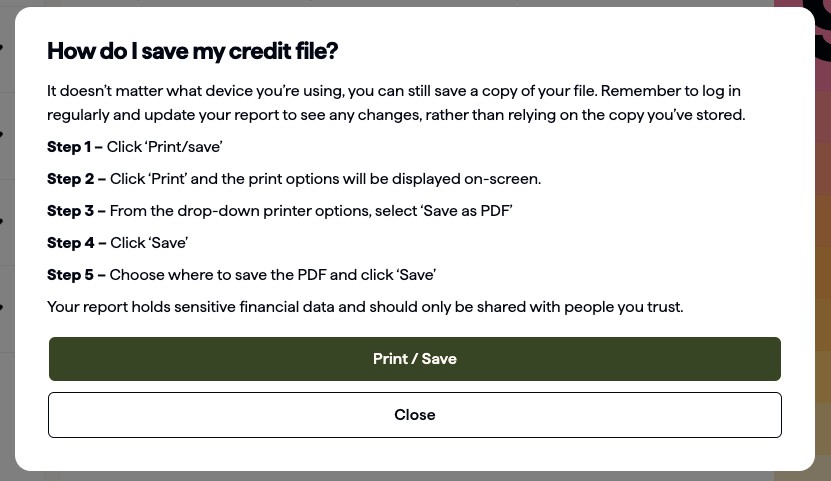
How to Save Your Check My File Report on Desktop
Follow these steps to download your Check My File credit report on a computer or laptop:
- Log in to your account at checkmyfile.com.
- Scroll to the bottom of the ‘Home’ page.
- Click ‘Print/Save my file’.
- When the print options appear, choose ‘Save as PDF’ from the printer list.
- Click ‘Save’.
- Choose where to save your file on your device and click ‘Save’ again.
💡 Tip: Save your report with a clear name, e.g. “CheckMyFile_Report_[YourName]_[Date].pdf”.
How to Download Your Check My File Report on iPhone or iPad
- Open the Check My File website and log in.
- Scroll to the bottom of the ‘Home’ page.
- Tap ‘Print/save my file’.
- Tap the share icon (square with an arrow).
- Select ‘Options’.
- Choose ‘PDF’ and tap ‘Done’.
- Tap ‘Save to Files’ and select a folder.
- Tap ‘Save’.
Your full multi-agency report will now be stored as a PDF on your device.
How to Save Your Check My File Report on Android
- Log in to your Check My File account.
- Scroll to the bottom of the ‘Home’ page.
- Tap ‘Print/save my file’.
- Select ‘Print/Save’ to open print options.
- Choose ‘Save as PDF’ from the printer drop-down menu.
- Tap the download PDF icon.
- Choose a folder on your device and tap ‘Save’.
Your PDF will now be available in your device’s Downloads folder unless another location is selected.
Is My Check My File Credit Report Secure?
Yes — your Check My File report contains sensitive financial information, so it’s essential to store it securely.
To protect your data:
- Save the file in a password-protected folder or secure cloud storage.
- Avoid sharing it through public or unsecured links.
- Only send it to trusted professionals, such as your mortgage adviser or solicitor.
- Delete older versions once they’re no longer needed.
If you suspect any data issues, you can contact Check My File support or the relevant credit reference agency to correct inaccuracies.
READY TO GET STARTED?
Make a mortgage enquiry with Mortgage Bridge
If this guide relates to your situation, you can make a quick mortgage enquiry and we’ll be in touch to understand what you’re looking to do and how we can help.
Make a mortgage enquiry →No obligation. Mortgage Bridge acts as a mortgage introducer.
Why We Ask for a Check My File Credit Report
When you choose to work with a mortgage adviser, they need a clear and accurate picture of your credit history. A Check My File report brings together information from multiple credit agencies in one place, which can be helpful at an early stage.
Sharing your report allows the adviser you are introduced to to:
- See how your credit history appears across different credit reference agencies
- Identify any issues or inconsistencies before a full application is submitted
- Assess which lenders may be more suitable based on published criteria
Having this information upfront can reduce the risk of unnecessary applications and delays.
Final Thoughts
Downloading and saving your Check My File credit report helps make the mortgage process clearer and more efficient.
It gives the adviser you are introduced to a better understanding of your overall financial position and allows potential issues to be reviewed before they affect an application.
At Mortgage Bridge, we help you gather the right information and introduce you to an FCA-regulated mortgage adviser who can review your circumstances in full and discuss your options.
If you’re ready to move forward, we’re here to help you take that next step.
Check your credit in detail
Access your full credit report
See your complete credit information from all three major agencies with Checkmyfile. Try it free, then it’s a paid monthly subscription – cancel online anytime.
Get started now
Important information: Mortgage Bridge provides information only and acts as a mortgage introducer. We do not provide mortgage advice or make lender recommendations. We can introduce you to an FCA-regulated mortgage adviser who can provide personalised mortgage advice.